“The computer was born to solve problems that did not exist before.” Bill Gates
The computers that we know in general is a combination of multiple modules and devices working together to run a set of functionalities expected from them.
In this section we will introduce you to these modules and devices and explain in more details about why each of these modules exists in the first place.
When working with a programming language (no-matter what kind) you’ll hear a lot of times about these modules so knowing them here will help you at later times to better understand how your program is actually running behind the scene.
Inputs are those modules and devices that get the data from the user and send it to the processor-modules.
Some examples of these modules are:
-
Mouse: When we change the position of a mouse device, it sends
data to the processor-module which then the processor analyze these data
and responds accordingly (for example it’ll change the position of the
mouse cursor based on the data it got from the user). Also when
clicking, the same process happens. -
Keyboard: this is another input device that we use in order to
send alphabetical or numerical and other type of characters into the
computer.
Obviously there are more input modules that we could name them all here, but the purpose of all of them is mainly to gather data from users and send them to other modules within the computer for processing.
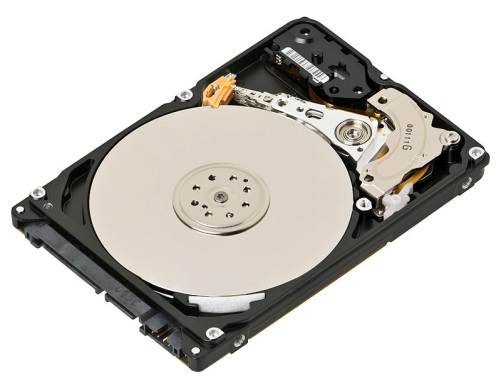
Hard-Disk:
 This picture is taken from: https://en.wikipedia.org/wiki/Hard_disk_drive#/media/File:Laptop-hard-drive-exposed.jpg
 This picture is taken from:
 Hard-Disk is considered to be the storage device of a computer. This device is the place where all data including music, games, documents, software etc. within our computer is stored. No matter if the computer is on or off, the data within this device will stay there and we can access them whenever we want.
Hard-disks are mainly divided based on the amounts of data they can store.
These days a typical hard-disk can almost store more than 250 Gigabytes of data within itself.
Note: GB is the shorthand version of Gigabyte.
Central-Processing-Unit (CPU):
 This picture is take from: https://en.wikipedia.org/wiki/Ultra-low-voltage_processor#/media/File:AMD_Geode_LX_800@0.9W_Processor_(white_background).jpg
 This picture is take from:
 Processors also known as Central-Processing-Unit (CPU) are the brain of a computer. Any program you run within your computer, no matter what that is, it’s the processor that run those programs for you.
For example, if you open your web-browser, that program is run by the processor within your computer. If you are lessoning to music, it’s the processor that run the media-player program and brings the music-data from the had-disk and sends it to the speaker so that you can hear the music.
(Actually there are more modules get involved in order to bring music data from hard-disk and send it to speakers but the main organizer of all these actions is the CPU).
You should know that a CPU is insanely fast! They can run billions of instructions and orders of a program just under a second (this is roughly equals to processing a few gigs of data per second).
For example it’ll only take a few milliseconds for a CPU to count from 0 to one billion! Guess how many hours can it take for you to count from 0 to one billion?!
Note: you’ll learn more about “instructions” in software section.
Random-Access-Memory (RAM):
 This picture is taken from: https://en.wikipedia.org/wiki/Random-access_memory#/media/File:Swissbit_2GB_PC2-5300U-555.jpg
 This picture is taken from:
 Just like Hard-Disk, this module is used to store data of any type: software, documents, music etc.
But the question is, if we have a hard-disk to store these data, why do we need this module then?
The answer is SPEED.
As we mentioned in CPU section, the speed of CPUs are insane (Processing billions of instructions and Gigs of data per-second).
But hard-disks on the other hand are slow in transmission of data to and from CPU. For example these days a fast hard-disk can send data to another computer-module with the speed of roughly 150 megabytes amount of data per-second (roughly speaking, it’s equal to 10% of the CPU’s speed).
As you can see, there’s huge difference between the amount of data that a CPU can process and the amount of data that a hard-disk can prepare to be processed per-second.
So if we sent data directly from hard-disk to CPU that would be a real waste of CPU’s time. Because the CPU is faster, it has to wait for a long time until it receives data from hard-disk and after it processed that data, the result of this process should be sent to the hard-disk which again will take time and makes the CPU stay idle even more.
For this reason, the designers of computer added another module named “Random-Access-Memory” or RAM for short (also called “MEMORY” as well).
This module sits between hard-disk and the CPU.
When a CPU wants to run a program (for example your media-player) this program is first loaded into the RAM (memory) and then the CPU will request instructions of this program directly from the RAM and not the Hard-disk anymore.
This is because RAM is way faster than hard-disk (still slower than the speed of CPU but way faster than hard-disk).
Also we call RAM a temporary memory because data that come to the memory will not stay there forever. Technically based on the request of CPU the data will be moved from hard-disk to RAM (and vice versa) and when the data is no-longer needed it’ll be removed from the memory (RAM).
Note: the data that comes to the memory (RAM) from a hard-disk is actually a copy of the data that is in hard-disk. So if the data is removed from the memory (RAM) that doesn’t mean the entire data is removed from the hard-disk as well!
Also you should know that if the power of a computer is lost, so the data in the memory (another reason why it’s called “temporary”).
Again, memory (RAM) is temporary and nothing last forever in this module. We use this module to increase the speed of data transmission to and from the CPU.
As the last note about RAM module, you should know that the amount of space this module can take is way lesser than a hard-disk.
For example these days the best memories that you find in the market can store data somewhere around 16 to 32 GB (Gigabyte) of data.
This is because in today’s market, the best CPUs can’t process more than a few gigs per-seconds so for now there’s no need for memories with the capacities of 100s of Gigabytes. (Note: we’re talking about home-computers not servers and advanced computers.)
Outputs:
Any modules that basically give something back to the user of the computer can be considered in the category of output modules and devices.
For example, the display device (monitor) can be considered as an output device because it shows the result of actions we do in computers.
Printer is another example of output devices which is used to print data (document, picture etc.) on papers.
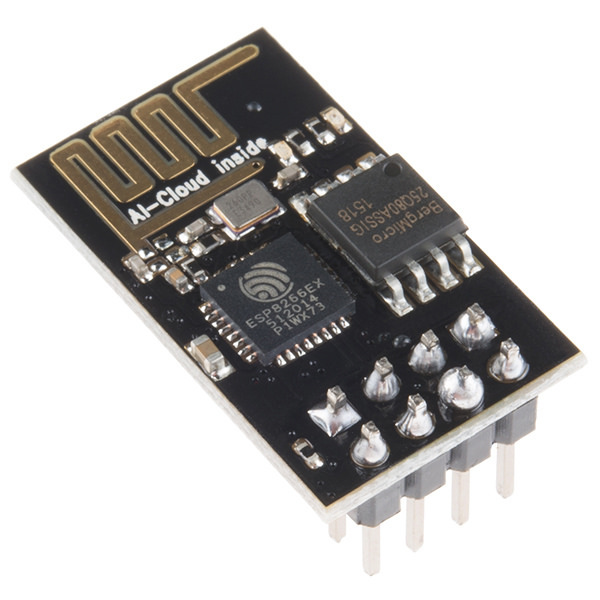
Another module that can be considered as the output module (as well as input module!) is Wi-Fi module.
 This picture is take from: https://upload.wikimedia.org/wikipedia/commons/8/84/ESP-01.jpg
 This picture is take from:
 This module installed mostly within laptops and mobiles and is used to send and receive data to and from another computer and so we can put it in the category of Input and Output modules at the same time.
Motherboard:
 This picture is taken from: https://en.wikipedia.org/wiki/Motherboard#/media/File:Computer-motherboard.jpg
 This picture is taken from:
 Motherboard as the name suggest, is the main board on which all the modules mentioned so far and many more sit on it or somehow connected to it. The main job of the motherboard is to provide lines of communication between each module of the computer.
Here’s a closer look to these lines (also called Bus) on a motherboard:


.jpg)