
In this section we will learn what <abbr> element in HTML is and how it works.
Abbreviation in HTML: What is <abbr> (abbreviation) Tag in HTML?
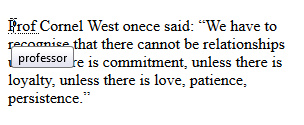
The HTML <abbr> tag stands for abbreviation and we use it when we have a word in a paragraph that represents an abbreviation. The beauty of this HTML element is that it has an attribute named title that allows us to put the full form of the abbreviated word in it and then when a user hover the mouse cursor on the abbreviated word, the full form will appear automatically in a tooltip on top or below that abbreviated value.
HTML <abbr> Tag Syntax:
<abbr title = "Full-form-of-the-abbreviation-value "> Abbreviation </abbr>HTML <abbr> Tag Values
For the title attribute we put the full form of the abbreviated value.
Of course for the value in the body of the <abbr> element we set the word/s that is considered as an abbreviation.
HTML <abbr> Tag Note:
The attribute title is basically a global attribute and is not limited to just the <abbr> element! This means you are free to use it with other HTML elements as well.Example: abbreviation for HTML
<!DOCTYPE html>
<html>
<head>
<title> HTML is fun 🙂 </title>
</head>
<body >
<p>
<abbr title = "professor">Prof </abbr>Cornel West once said: <q>We have to recognize that there cannot be relationships unless there is commitment, unless there is loyalty, unless there is love, patience, persistence.</q>
</p>
</body>
</html>
Output:

Acronym vs Abbreviation
Other than <abbr> element, there’s another HTML element named <acronym> which is used to do the same job as <abbr>. The HTML <acronym> element was introduced before the rise of HTML5 and in the version 5 of HTML, there’s no support for <acronym> element. So for this reason it is best to stick with <abbr> and use it whenever you need to represent an abbreviation on a page.