
So if you want to speak a language you should care about grammar as well.
CSS is language and like any other language it has its own grammar which we call CSS structure.
But unlike other languages, it’s super easy and fast to learn. So sit back and relax.
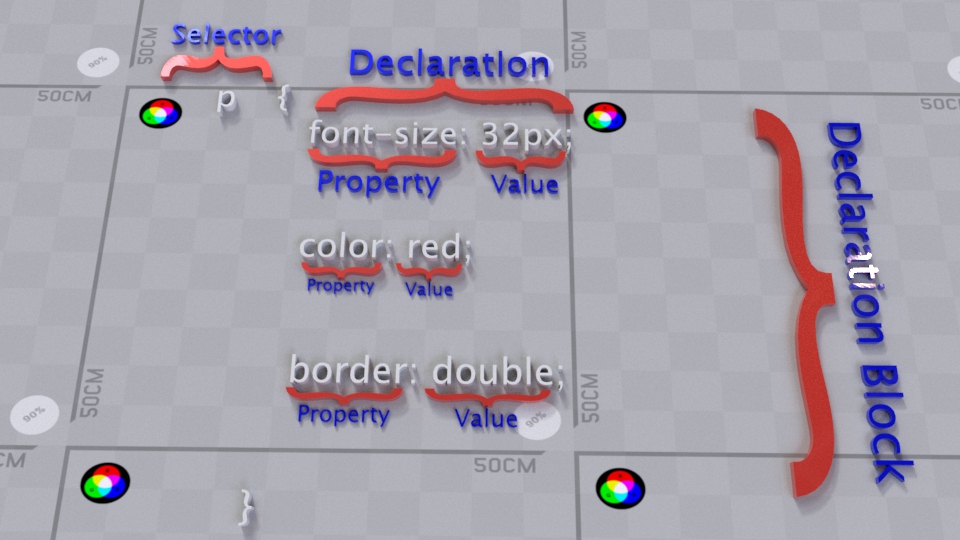
In this section we will study the anatomy of CSS language.
In order to turn the color of a paragraph (<p> element) into red using CSS language, you need to go like this:
p{
color: red;
}
The code above will turn the color of text content within any <p> element into red.
Example:
<!DOCTYPE html>
<html>
<head>
   <title>CSS is fun :)</title>
  <style type="text/css">
      p{
         color: red;
      }
  </style>
</head>
<body>
   <p> A simple paragraph is comprised of three major components. The first sentence, which is often a declarative sentence, is called the “topic sentence.” It introduces the topic of the paragraph, setting its tone and mood. The next few sentences elaborate, explain, and exemplify the topic introduced in it.</p>
   <p> A simple paragraph is comprised of three major components. The first sentence, which is often a declarative sentence, is called the “topic sentence.” It introduces the topic of the paragraph, setting its tone and mood. The next few sentences elaborate, explain, and exemplify the topic introduced in it.</p>
   <p> A simple paragraph is comprised of three major components. The first sentence, which is often a declarative sentence, is called the “topic sentence.” It introduces the topic of the paragraph, setting its tone and mood. The next few sentences elaborate, explain, and exemplify the topic introduced in it.</p>
</body>
</html>
This is the overall view of CSS structure:


Selector:
Selector tells browser which element/s to be formatted in a page. Basically in selector spot we declare the target/s of the style that we want to apply.
There are multiple ways of selecting the target element/s and apply a CSS style to it.
Just to name a few of these ways:
-
Target selections based on ID attribute.
-
Target selections based on Class attribute.
-
Target selections based on Element name attribute.
-
Target Selections based on Pseudo-Class and
Pseudo-Elements.
In the next couple of sections we explained in details each and every way of selecting elements.
Declaration Block:


The area between open bracket ({) and close bracket (}) of a CSS style is considered to be the Declaration block. In this area we declare any format that we want to apply to a Selector.
Declaration:


Within the body of a Declaration Block we can insert one or more formats to the selected element/s. Each of these formats that we apply to an element is called Declaration.
Declaration has two parts: "property" and "value". These two parts are separated using colon ':' and the entire declaration ends with semicolon ';'Note: don’t forget to end each declaration with semicolon.
Property:


CSS offers a variety of formatting options that we can apply to one or more elements. Each of these formatting options is called Property.
Properties are words or multiple hyphenated words. The names of these properties are often straight forward. For example “font-size”, “background-color”, “width”, “height”, “margin” etc.
Value:


Value is the part in a Declaration that we set for a property.
For example if the property is “background-color” we can set the value of this property to a variety of color names like blue, red, green, black etc.
Note: Each CSS property and the type of value that can be assigned to it, is explained in its related section.