
In this section, we will learn what the flex align-items property is and how to use it in CSS.
Click here to run the first example.
Click here to run the second example.
CSS flex align-items Property Definition and Usage
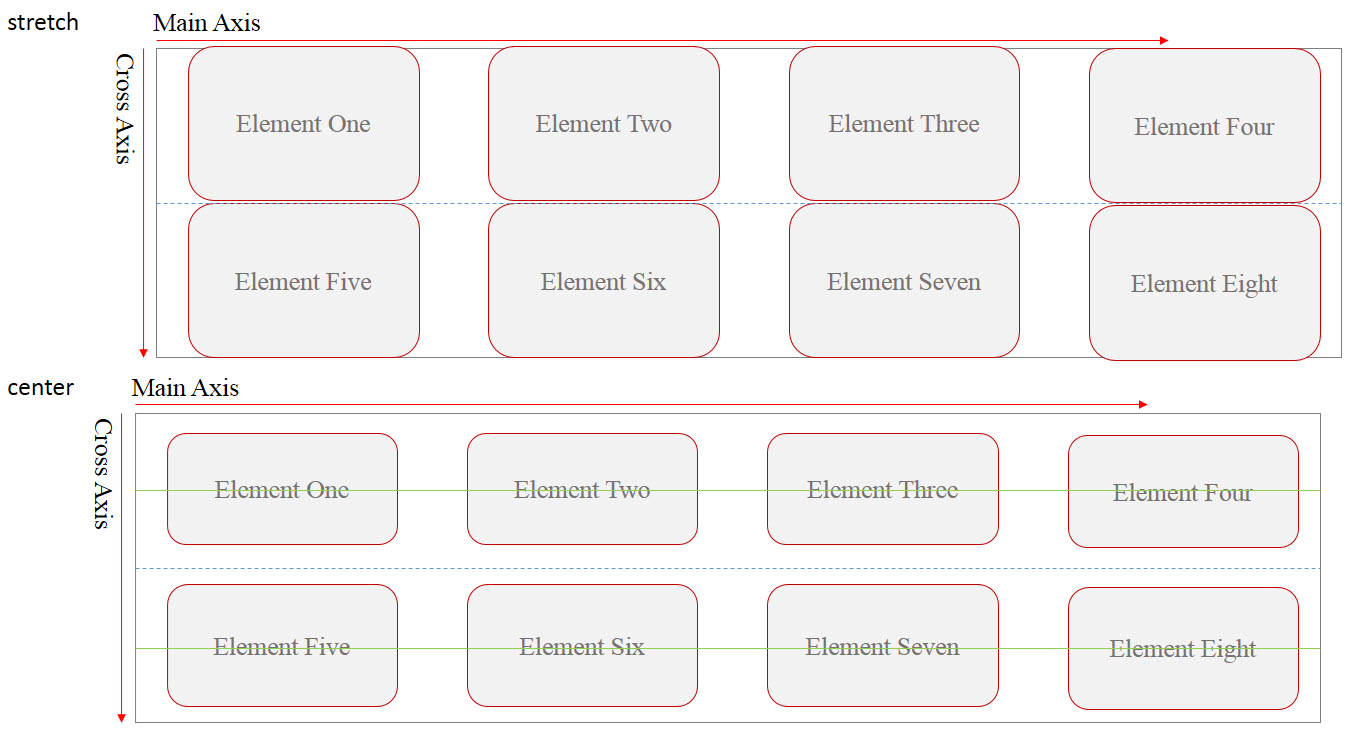
By default, if we don’t set the height of flex-items, they will stretch along Cross-Axis of the Flex-container and fill the entire space of their flex-line.
But CSS provided a property named align-items by which we can control the positioning of flex-items altogether along Cross-Axis of their container.
CSS flex align-items Property Syntax
align-items: stretch|center|flex-start|flex-end|baseline|initial|inherit;CSS flex align-items Property Value
The values we can set for align-items property are:



-
flex-start: using this value, flex-items will be
positioned as close as their flex-line allows, to the start-point of the
container’s Cross Axis. -
flex-end: using this value, flex-items will be
positioned as close as their flex-line allows to the end-point of the
container’s Cross Axis. -
center: using this value, flex-items will be
positioned on the center of their flex-line. -
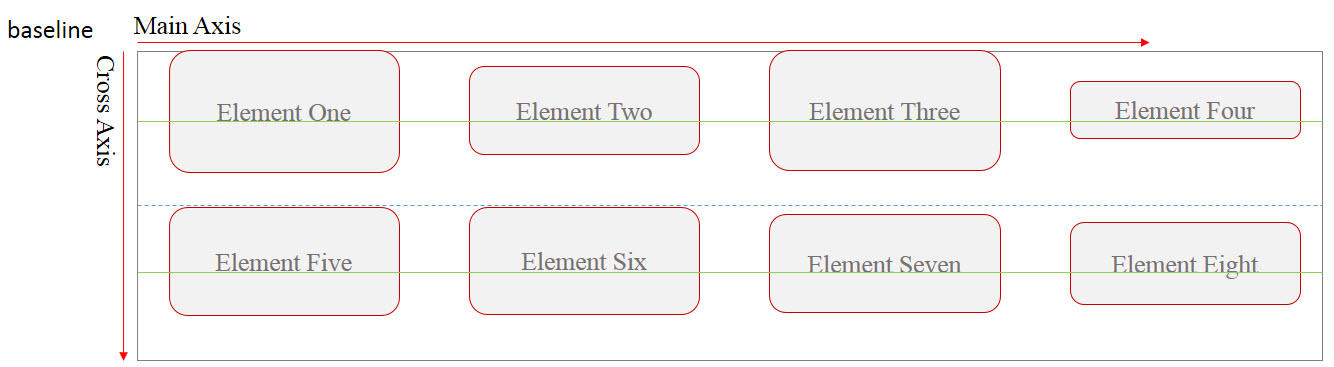
baseline: using this value, flex-items will be
positioned in a way that their baseline aligns with each other.
Note: flex-items within each flex-line have their own baseline.
-
stretch: using this value, it makes flex-items
to stretch along Cross-Axis of the container until they fill the entire
space of their flex-line. This is the default
value.
Example: flexbox align items
<!DOCTYPE html>
<html>
<head>
<title>CSS is fun :)</title>
<meta name="viewport" content="width=device-width, initial-scale=1.0">
<style type="text/css">
*, ::after, ::before{
margin:unset;
box-sizing: border-box;
}
.flex{
display: flex;
width:100vw;
height:5em;
flex-wrap: wrap;
justify-content:space-between;
align-items: flex-end;
border:thin solid red;
}
.item{
min-width: 10vw;
flex:0 1 auto;
}
.item:nth-child(odd){
background-color: orange;
}
.item:nth-child(even){
background-color: lightskyblue;
}
</style>
</head>
<body>
<h1>Center</h1>
<div class = "flex">
<div class = "item item1">Item One</div>
<div class = "item item2">Item Two </div>
<div class = "item item3">Item Three</div>
<div class = "item item4">Item Four</div>
<div class = "item item5">Item Five</div>
</div>
</body>
</html>
Example: align items center
<!DOCTYPE html>
<html>
<head>
<title>CSS is fun :)</title>
<meta name="viewport" content="width=device-width, initial-scale=1.0">
<style type="text/css">
*, ::after, ::before{
margin:unset;
box-sizing: border-box;
}
.flex{
display: flex;
width:100vw;
height:5em;
flex-wrap: wrap;
justify-content:space-between;
align-items: center;
border:thin solid red;
}
.item{
min-width: 10vw;
flex:0 1 auto;
}
.item:nth-child(odd){
background-color: orange;
}
.item:nth-child(even){
background-color: lightskyblue;
}
</style>
</head>
<body>
<h1>Center</h1>
<div class = "flex">
<div class = "item item1">Item One</div>
<div class = "item item2">Item Two </div>
<div class = "item item3">Item Three</div>
<div class = "item item4">Item Four</div>
<div class = "item item5">Item Five</div>
</div>
</body>
</html>